Speed Settings for KitchenAid stand mixers are one of the most overlooked parts of getting truly consistent baking results. Many people see the 10-speed control and assume it is simply there to offer more power, but that is only part of the story. In reality, each setting is designed to control texture, mixing intensity, and ingredient development in a very specific way.
If you have ever used a KitchenAid stand mixer and wondered whether all 10 speeds really matter, the answer is yes—but not because you need to use every single one all the time.
The KitchenAid Artisan 10-speed stand mixer is less about raw strength and more about control. The right speed can help you gently combine ingredients, build structure in dough, or create the light texture you want in whipped mixtures. The wrong speed, on the other hand, can overmix batter, overwork gluten, or ruin the consistency you are trying to achieve.
That is why understanding speed settings is not just a technical detail—it is one of the easiest ways to improve your results in the kitchen. Once you know what each speed is actually meant to do, the mixer becomes much easier to use with confidence in real everyday cooking and baking.
Start Slow — Always
Speed 1, also labeled “Stir,” is the most underrated setting on the mixer.
This is where everything should begin. Whether you’re combining dry ingredients or starting a batter, this slow speed keeps things under control. No flour clouds exploding into your face, no ingredients flying out of the bowl—just a clean, steady start.
It might feel too slow at first, but that’s exactly the point. You’re building the foundation of your mixture here.
Low Speeds (2–3): Where Steady Mixing Really Matters
For most everyday baking and cooking, Speeds 2 and 3 are where your KitchenAid starts doing its most practical work. These settings may not feel dramatic, but they are often the most useful because they give you control without overwhelming the mixture.
This is the range you’ll rely on when ingredients need time to come together gradually. Instead of forcing the mixture too quickly, these lower speeds help create a more even texture from the start. That matters a lot when you’re making cookie dough, kneading bread, mashing softer ingredients, or blending mixtures that can easily become uneven if overworked too soon.
Another reason these speeds matter is that they allow the mixer to work with resistance more comfortably. Thick doughs and heavier mixtures need torque and consistency more than speed. Running too fast too early can stress both the ingredients and the machine, especially when the mixture is dense.
That is why yeast dough should always stay at Speed 2. This recommendation is not just about technique—it also helps protect the motor from unnecessary strain. If you bake bread often, understanding this one limit can make a real difference in both dough quality and the long-term life of your mixer.
In other words, low speeds are not the “weak” settings. They are the foundation settings. They give ingredients time to hydrate, combine, and develop properly before you ask the mixer to do anything more aggressive.
Medium Speeds (4–5): The Balance Between Power and Control
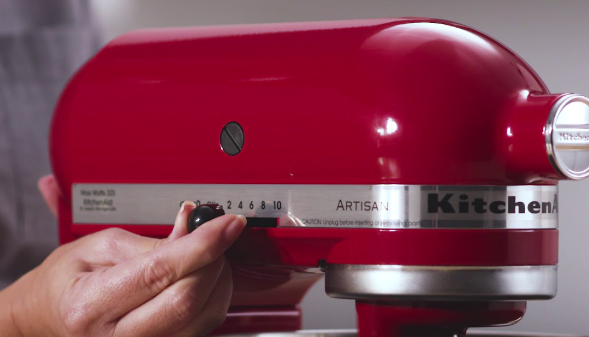
KitchenAid Artisan Speed Settings
If low speeds are about building the base, medium speeds are where that base turns into a finished mixture. Speeds 4 and 5 are often the most balanced settings on the mixer because they give you enough movement to blend ingredients thoroughly while still keeping the texture under control.
This is the range that works especially well for cake batters, softer cookie doughs, frostings, and the early stages of whipping. At these speeds, ingredients are mixed more efficiently and evenly, but not so aggressively that you immediately risk knocking out structure or overworking the mixture.
That balance is exactly why so many recipes quietly live in this zone, even when they simply say “mix until smooth” or “beat until combined.” In practice, this is often what those instructions are pointing to. You want enough speed to create a cohesive batter, but not so much that the final texture becomes dense, tough, or overly aerated.
Medium speeds are also helpful because they give you visual feedback quickly. You can see the batter smooth out, the butter and sugar lighten, or the mixture become more uniform without losing the sense of control you still have at lower settings. That makes this range especially forgiving for home bakers who want reliable results without having to guess too much.
If there is a true “sweet spot” on a KitchenAid mixer, this is it. Speeds 4 and 5 are often where efficiency, consistency, and texture all meet in the middle.
Medium-High Speeds (6–7): Where Texture Starts to Take Shape
Once you move into Speeds 6 and 7, you are no longer just mixing ingredients—you are actively changing their texture. This is the range where the mixer begins to incorporate a noticeable amount of air, which is why these settings are so useful for recipes that depend on lightness, volume, and a softer final structure.
These speeds are especially effective when creaming butter and sugar, beating mixtures until fluffy, or starting to whip ingredients that need body. In many recipes, this stage is what creates the difference between something that feels dense and heavy and something that turns out soft, smooth, and well-aerated.
What makes this range so useful is that it gives you enough speed to build texture efficiently without immediately pushing the mixture to its limit. You can watch butter become pale and airy, frostings turn smoother and lighter, and whipped mixtures begin to hold shape. It is often the point where ingredients stop looking simply combined and start looking finished.
At the same time, this is where control becomes even more important. Medium-high speed is helpful, but it should not be treated like a default setting for every task. Mixing too long in this range can introduce more air than you actually want, or start changing the structure of the mixture in ways that hurt the final result.
That is why these speeds work best when used with intention. Let the mixer build the texture you need, then stop once you reach that stage. In many cases, timing matters just as much as speed.
High Speeds (8–10): Best Reserved for Specific Finishing Tasks
Speeds 8 through 10 are the most powerful settings on the mixer, and they are best thought of as specialty speeds rather than everyday ones. These are the settings you reach for when a recipe needs maximum aeration and a fast transformation in texture.
This is where whipping cream, beating egg whites, and building stiff peaks for meringue or frostings really happen. High speed helps create volume quickly, which is why it is so useful for recipes that rely on air for lift, shape, and visual finish. If you want glossy peaks, airy whipped cream, or that dramatic bakery-style look, this is the range that gets you there.
But high speed also leaves less room for error. Because it works so quickly, it is easy to go from perfectly whipped to overbeaten in a short amount of time. Cream can turn grainy, egg whites can lose their ideal texture, and delicate mixtures can collapse if they are pushed too far.
This is one of the biggest mistakes people make with stand mixers—they assume the highest speed will always create the best result. In reality, high speeds are only useful when the recipe truly calls for them. Used too long or in the wrong situation, they can break down structure, flatten air bubbles, and undo the texture you were trying to build.
That is why the highest settings should always be used with purpose. They are excellent finishing tools, but they are not meant for every stage of mixing. When used correctly, they create lightness and volume. When overused, they can ruin both.
Fine-Tuning Makes a Difference
One thing many people overlook is that you’re not limited to whole-number speeds.
You can set the lever between speeds—like 3, 5, or 7—to fine-tune your mixing. This is especially useful when a recipe feels like it needs “just a bit more” or “slightly less” power.
It’s a small detail, but it gives you a lot more control once you start paying attention to it.
It’s Not About Using Every Speed
Here’s the truth most guides won’t tell you: you don’t need to use all 10 speeds regularly.
In fact, great cooking is less about using every option available and more about using the right one at the right time. Most recipes will live comfortably between Speeds 2 and 6.
The higher speeds? Think of them as tools for specific moments—not your default setting.
Once you understand that, the mixer becomes a lot less intimidating—and a lot more useful. 
Refer to KitchenAid for more info:

Which KitchenAid Mixer Speed Should You Actually Use Most?
If you’re wondering which speed you’ll end up using the most, the answer might surprise you—it’s not the highest one.
For most everyday recipes, Speed 2 to Speed 4 will do about 80% of the work. Whether you’re mixing cookie dough, combining cake batter, or kneading light dough, these mid-low speeds give you the best balance between control and efficiency.
Higher speeds are useful, but they’re more situational. You’ll only reach for Speed 6 and above when you need to whip, cream, or create air in your mixture. And even then, it’s usually for short bursts—not long mixing sessions.
This is why many experienced home bakers rely heavily on just a few speeds instead of constantly adjusting the dial. It keeps the process simple, consistent, and easier to control.
If you’re still getting familiar with your KitchenAid Artisan 10-speed stand mixer, focusing on mastering a few key speeds first will give you better results than trying to use all 10 right away.
Once you build that intuition, the rest of the speed settings become tools—not confusion.
